
Mercari: Buy and Sell App
Mercari, IncShopping
4.7163.60K Reviews
- Version
- 9.47.1
- Installs
- 10.00M
- Age Rating
- Teen
Screenshots


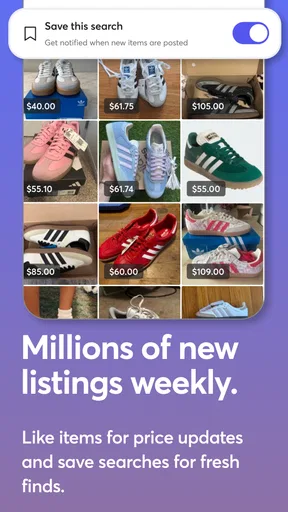



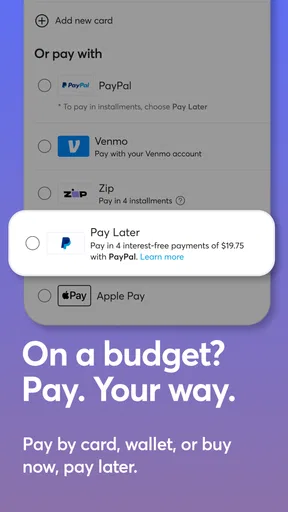
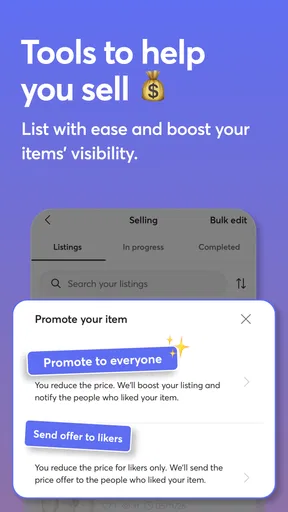
Our Review of Mercari: Buy and Sell App
 Analysis by Appyee
I found Mercari: Buy and Sell App most interesting when I treated it less like a traditional online shop and more like a busy mobile marketplace. The experience depends on a steady connection because browsing listings, checking item details, communicating with sellers, and moving through a purchase or sale all happen around frequently changing information. That makes the app convenient in the right setting, but noticeably less comfortable when the network is weak or when I am trying to make a decision in a hurry.
Developed by Mercari, Inc., this free shopping app brings together people looking for new-to-them items and people clearing out things they no longer use. Its focus on pre-owned goods gives the catalog a different feel from a normal retailer: I may find a practical replacement, a discontinued item, or something unusual, but I also need to spend more time judging condition, photos, wording, and seller communication. That extra uncertainty is part of the appeal and part of the work.
How Mercari feels when the connection is doing the heavy lifting
My first impression is that connectivity is not just a background requirement here; it shapes the rhythm of the entire experience. A marketplace listing is a moving target. Availability can change, a seller can update a description, and a conversation may affect whether an item is still worth pursuing. When the app is connected properly, scrolling through listings feels immediate enough to support casual discovery. I can start with a broad idea and narrow it down as I see what is actually available.
That live quality is useful for secondhand shopping because the catalog is not arranged like a fixed department store. Searching for a specific model, clothing size, hobby item, or household object can lead to several different versions with different conditions and prices. I found that the best results came from treating search as an investigation rather than typing one phrase and accepting the first attractive photo.
Connectivity matters even more once I open an individual listing. Photos, descriptions, seller details, and the surrounding purchase information need to be read together. A picture may show wear that the title does not mention, while the written description may clarify something that is difficult to see. If images load slowly, I am more likely to make a rushed judgment, which is exactly what I want to avoid with used goods.
The same applies to selling. Mercari is appealing when I have a drawer, closet, or shelf full of things that still have value but no longer fit my life. I can prepare a listing from a phone instead of setting up a separate selling workflow on a computer. However, a successful listing is not created by connectivity alone. Clear photos, accurate wording, and realistic expectations still determine whether the item attracts serious interest.
Why the marketplace format changes the shopping decision
Compared with buying from a conventional retailer, the strongest difference is the balance between discovery and certainty. A retailer usually gives me a standardized product page and a predictable presentation. Mercari gives me more variety, but the information may be uneven from one listing to another. That means I have more responsibility as a buyer. I need to compare photos, read the full description, and notice whether important details are answered clearly.
Compared with a general local classifieds service, the app feels more suited to browsing a wider range of items rather than arranging everything through a single neighborhood conversation. That can be useful when I am looking for a particular object that may not appear nearby. The trade-off is that a remote transaction requires more attention to the listing and the communication around it.
I also would not use Mercari as my first choice when I need something immediately or when I require a highly predictable retail experience. A local store can be better for urgent replacements, and a specialist retailer may be better when exact compatibility or warranty confidence matters more than finding a bargain. Mercari is strongest when I can accept some searching and enjoy the possibility of finding something outside the usual retail selection.
Using it in ordinary mobile situations
The app makes the most sense in short, purposeful sessions. I might browse while waiting for an appointment, save a search idea mentally, or check whether a particular type of item appears at a reasonable price. Those moments are convenient because the phone is already with me. I do not need to sit down at a desk to investigate a category that has suddenly become relevant.
There is a practical difference between browsing casually and making a serious purchase on mobile data. Browsing many image-heavy listings can consume attention and connection time, while comparing a small group of carefully chosen listings is much more efficient. I recommend deciding what matters before opening the app: the acceptable condition, the essential features, and the point at which a used item is no longer worth the uncertainty.
A realistic example is replacing a kitchen appliance accessory that is no longer sold in nearby shops. I would search using the item name, then try a model identifier or a description of the part. After opening several listings, I would compare the visible wear, included pieces, and wording rather than choosing solely by the lowest displayed price. If the connection is unstable, I would avoid making the final decision until every relevant image and detail has loaded properly.
For sellers, a mobile workflow is particularly useful after a small home clear-out. I can group similar items, photograph them in consistent lighting, and write descriptions while the details are fresh. My advice is to draft the important facts before relying on a quick upload: brand, visible flaws, dimensions when relevant, and what is or is not included. This reduces the chance of publishing a vague listing simply because I am working from a phone.
What happens when the network becomes unreliable
The most frustrating moments arrive when I am in the middle of comparing listings and the connection falters. A marketplace is difficult to use confidently if photos appear partially, pages take too long to refresh, or a conversation does not update when I expect it to. I would rather pause than interpret incomplete information as a final answer.
My recovery habit is simple: I stop making decisions based on a page that has not fully loaded, return to the relevant listing when the connection improves, and reread the details from the beginning. This sounds cautious, but secondhand purchases often turn on a small detail. A missing accessory, a mark in a corner of a photo, or a qualification in the description can change the value of the item.
When selling, a failed or interrupted session can also create uncertainty about whether I have completed an action. I avoid repeatedly tapping buttons when the screen is slow. Instead, I wait, check the listing or account state after reconnecting, and only then continue. Repeating an action without checking can make a simple mobile problem more confusing.
Communication deserves the same patience. If I am waiting for a seller response or trying to answer a buyer, I do not assume silence immediately means disinterest. A weak connection can interrupt a normal exchange, and the app is built around people rather than an instant automated checkout alone. Clear, concise messages are easier to resend or verify than a long explanation typed in a hurry.
This is one area where the app is less forgiving than a static shopping guide. A guide can remain readable even when I lose connectivity; a marketplace depends on current listings and interactions. I therefore treat network quality as part of the buying environment. At home or on a reliable connection, the experience feels much more controlled than it does in a crowded place with inconsistent service.
Keeping mobile data use under control
I would not describe Mercari as an app to use carelessly for hours on a limited mobile plan, especially when browsing large numbers of photo-led listings. The exact cost depends on the device, network, and usage pattern, but the sensible approach is to use Wi-Fi for extended comparison sessions and reserve mobile browsing for targeted checks.
A data-conscious workflow starts with a narrow search. Instead of repeatedly refreshing a broad category, I would decide which words describe the item accurately, inspect a manageable set of results, and leave listings that clearly fail the basic requirements. This saves both data and time. It also reduces the temptation to buy simply because endless scrolling produced a visually appealing option.
When I am selling, I can be more deliberate by preparing photos before opening the app. I would take several useful images in one session, remove duplicates, and choose pictures that answer likely questions. That is better than uploading many similar shots while moving between weak and strong connections. It also makes the listing easier for another mobile user to evaluate.
Data awareness does not mean avoiding photos. On Mercari, photos are often the quickest way to judge whether a used item deserves further attention. The better compromise is to inspect the first useful image, read the description, and then load additional images when the listing remains promising. For clothing, collectibles, electronics, and items with visible wear, those extra images can be worth the connection cost because they reduce the risk of misunderstanding the condition.
Who will get the most from this app
I think Mercari suits people who enjoy patient comparison and are comfortable making judgments from user-created listings. It is a good match for someone clearing out possessions, hunting for unusual secondhand goods, or trying to find an older item that is no longer easy to locate through ordinary retail. The free price also makes it easy to try without committing to a subscription.
It can be especially useful for sellers who want a phone-centered way to turn unused belongings into money, provided they are willing to photograph and describe items honestly. The app does not remove the work involved in selling. It gives that work a marketplace, but the seller still needs to organize the item, communicate clearly, and manage expectations.
Buyers who want a polished, uniform catalog may need an adjustment period. Listings can differ in photography, detail, and presentation, so I would not recommend rushing through the process. Likewise, anyone who strongly prefers immediate possession, standardized returns, or the confidence of a conventional retailer may be happier elsewhere.
The Teen content rating is worth keeping in mind for households deciding which shopping apps are appropriate for younger users. I would still encourage any user to approach transactions thoughtfully, protect personal information, and keep communication focused on the item and the transaction rather than sharing unnecessary details.
Performance, reach, and the version I reviewed
Mercari has been available since September 1, 2014, and its scale is visible in the amount of activity a marketplace of this kind can support. It has passed ten million installs, carries a 4.7 average from around 615 thousand ratings, and has roughly 163 thousand written reviews. Those figures suggest that it is not a small experiment, although popularity does not remove the need to inspect individual listings carefully.
The version I reviewed is 9.41.1, and the app supports devices running Android 7.1 or newer. That broad compatibility is helpful for people who do not replace their phone frequently, but actual comfort still depends on the device, available storage, screen size, and connection quality. A newer phone may feel more pleasant when several images and marketplace pages are being handled in quick succession.
I also like that the app’s identity remains clear: it is a shopping marketplace rather than a general-purpose social feed with buying added as an afterthought. The focus helps me enter with a specific purpose. Still, the open-ended inventory can pull me into browsing, so I get better results when I set a spending limit and a clear reason for opening it.
My connectivity verdict
After using Mercari as both a browsing tool and a possible selling workspace, I see connectivity as its central practical condition. On a reliable network, the app makes secondhand shopping feel accessible and flexible. I can compare unusual items, inspect seller-provided evidence, and manage a sale from a mobile device. On an unstable connection, the same strengths become liabilities because incomplete images or delayed updates make confident decisions harder.
My strongest advice is to treat every listing as a small investigation, not an impulse purchase. Use a dependable connection for the final comparison, read beyond the title, inspect the photos that matter, and pause when the app has not fully refreshed. Sellers should prepare accurate material before posting, while buyers should accept that a lower price can come with more research.
For me, Mercari is worth recommending to people who value variety and are willing to do that extra checking. It is not the best replacement for an urgent retail purchase or a highly standardized buying experience. But if I have time to compare, a stable connection, and an interest in giving pre-owned goods another life, this free shopping app offers a practical and genuinely different way to buy and sell from a phone.
Privacy and Permissions
See what permissions an app requests and how it handles your data.
- Contacts
- read your contacts
- Photos/Media/Files
- read the contents of your USB storage, modify or delete the contents of your USB storage
- Storage
- read the contents of your USB storage, modify or delete the contents of your USB storage
- Camera
- take pictures and videos
- Microphone
- record audio
- Wi-Fi connection information
- view Wi-Fi connections
- Other
- view network connections, full network access, control Near Field Communication, run at startup, control vibration, prevent device from sleeping, read Google service configuration
Verdict
Strengths of Mercari: Buy and Sell App
- Simple listing tools make it easy to upload photos and start selling.
- In-app messaging helps buyers and sellers communicate before a purchase.
- Buyer protection can add reassurance when ordering from unfamiliar sellers.
- Search filters make it easier to narrow results by size, brand, and price.
- Users can find secondhand items that are no longer available in stores.
Limitations of Mercari: Buy and Sell App
- Listing visibility may depend heavily on competitive pricing and frequent activity.
- Popular items can sell quickly before you have time to complete checkout.
- Shipping options and costs may vary considerably between individual sellers.
- Some listings may have limited descriptions or low-quality photos.
- Availability and features differ by country, limiting access for some users.
Other Releases by Mercari, Inc
View All
Mercari Japan: Anime Shopping
Shopping4.1
Similar Picks in This Category
View All
SHEIN-Shopping Online
Roadget Business PTE. LTD.4.8

Amazon Shopping
Amazon Mobile LLC4.4


Mercado Libre: Compras online
Mercado Libre4.8

Wish: Shop and Save
Wish US Holdings LLC4.7

Alibaba.com - B2B marketplace
Alibaba Mobile4.4
Frequently Asked Questions
What is Mercari, and how does the app work?
Mercari is a mobile marketplace where individuals can buy and sell new or pre-owned items, including clothing, electronics, collectibles, home goods, and more. Sellers create listings with photos, descriptions, prices, and shipping details, while buyers browse categories, ask questions, make purchases, and track orders directly through the app. The exact features and availability may vary by country.
Is Mercari safe for buying and selling items?
Mercari includes several features designed to make transactions safer, such as in-app messaging, payment processing, seller and buyer ratings, order tracking, and purchase protection policies. However, users should still review listings carefully, check seller feedback, avoid sharing personal contact or payment information, and keep communication and transactions inside the platform. Protection rules, eligibility, and deadlines can differ depending on the market.
How much does it cost to sell on Mercari?
Creating a listing on Mercari is generally free, but sellers may pay fees when an item sells. These can include a selling or service fee, payment processing charges, shipping costs, and possible fees related to withdrawals or specific services. Since fee structures may change and differ by region, sellers should check the current fee information shown in the app before listing an item or accepting an offer.
How do shipping and delivery work on Mercari?
When selling an item, you typically choose a shipping method and package the order according to Mercari’s instructions. Depending on the listing, the buyer or seller may cover shipping, and the app may provide a prepaid label or shipping guidance. Buyers can usually follow delivery progress through tracking. Package size, weight, carrier availability, and shipping options vary, so reviewing the listing details is important.
What happens if an item is damaged, incorrect, or not as described?
If an order arrives damaged, is significantly different from its description, or never arrives, the buyer should contact Mercari support through the app as soon as possible and provide photos, tracking information, and other evidence. Buyers should avoid rating or completing the transaction before resolving the issue, because protection and return eligibility may depend on reporting within a specific time limit. Policies can vary by location and situation.
